2-Notebook USB-C Single-Monitor KVM-Switch 4K60Hz) with PD, KCEVE KC-KVM202TCC
This is a simple KVM-Switch for two USB-C laptops for the joint use of keyboard, mouse and a 4K monitor.
In the standard expansion mode of the computers, the windows can be drawn from the main screen to the second output screen.
- Designed for users who have 2 laptop with Type-C (from USB 3.2 Gen.1) andup to a HDMI monitor.
- Please use the Type-C cable replacement that supports data transmission. If the cable only supports charging, the monitor does not display a picture. Supports transmission of video and audio via USB Type-C (laptop).
- Support 60W PD Fast Charging: This KVM-Switch is equipped with a PD charging port to provide your laptop with sufficient power during use and charge it.
- Supports the following resolutions: Mnitor 1: 4k@60Hz, 2560x1440@/120Hz/60Hz, 1920x1440@144Hz/120Hz/60Hz, etc., Monitor 2 (only with additional driver installation): 1920x1080@60Hz.
- Supports 2 switching modes: This USB type C 2 monitor KVM-Switch for 2 computers supports physical buttons and wired control. The wired control allows you to hide the KVM-Switch under the table and keep your desk tidy.
- With 4x USB 3.0 (1x as USB-C) with 5Gbps for keyboard/mouse (also wireless), USB audio/headset, printer, etc.
- Installation: No drive required. However, a small driver installation is necessary in the operating system (Windows 10 or higher or Mac OS 11 or higher).
- Weight: approx. 300 g
- Dimensions: 20 x 15 x 5 cm
Technical notes:
a) To transfer images from the USB-C, a USB
3.1 Gen 2 or higher is required for every notebook. Only this supports the necessary DP Alt Mode and works with USB-C docking stations.
b) No EDID monitor simulation = content jumps when switching. Only with Windows 11 does the content (remember monitor positions) jump back again.
c) Driver installation required:
After you connect the product correctly, you will see a pop-up window in which you will be asked to install the USB driver. On YouTube, a video on installing the driver has also been uploaded.
| USB-Display |
Newer USB display driver for KCEVE KC-KVM202TCC (fixes startup problem with 1080p monitor) than on the product. |
Scope of delivery:
1 x 2-port USB-C KVM-Switch
2 x USB-C 3.1 Gen.2 cable (approx. 1m)
1 x HDMI cable (approx. 1m)
1 x cable remote control (approx. 1.5m)
1 x user manual (only English)


Developed for users with two computers with type C connection and two monitors with HDMI connection.

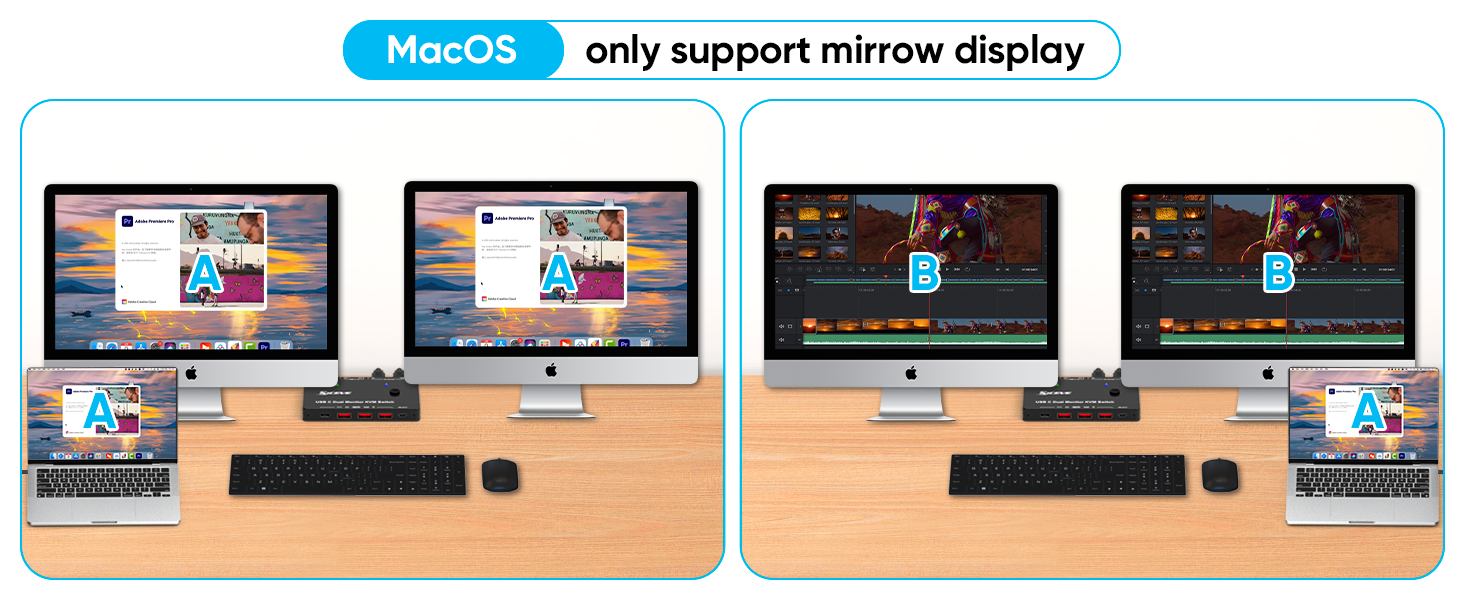
Note that SST and MST can be used in Windows operating systems to display two HDMI ports the same or different content.
Only (SST) is supported in MacOS, which means that both HDMI ports show the same picture.


.jpg "2-Notebook USB-C Single-Monitor KVM-Switch 4K60Hz with PD, KCEVE KC-KVM202TCC")


.jpg "Preview: 2-Notebook USB-C Single-Monitor KVM-Switch 4K60Hz with PD, KCEVE KC-KVM202TCC")


.jpg "2-Notebook USB-C Single-Monitor KVM-Switch 4K60Hz with PD, KCEVE KC-KVM202TCC")


